
Student portal
Schedule, notes, absences and documents
The student finds his timetable, his results, his supporting documents, his invoices and his requests from the same space.
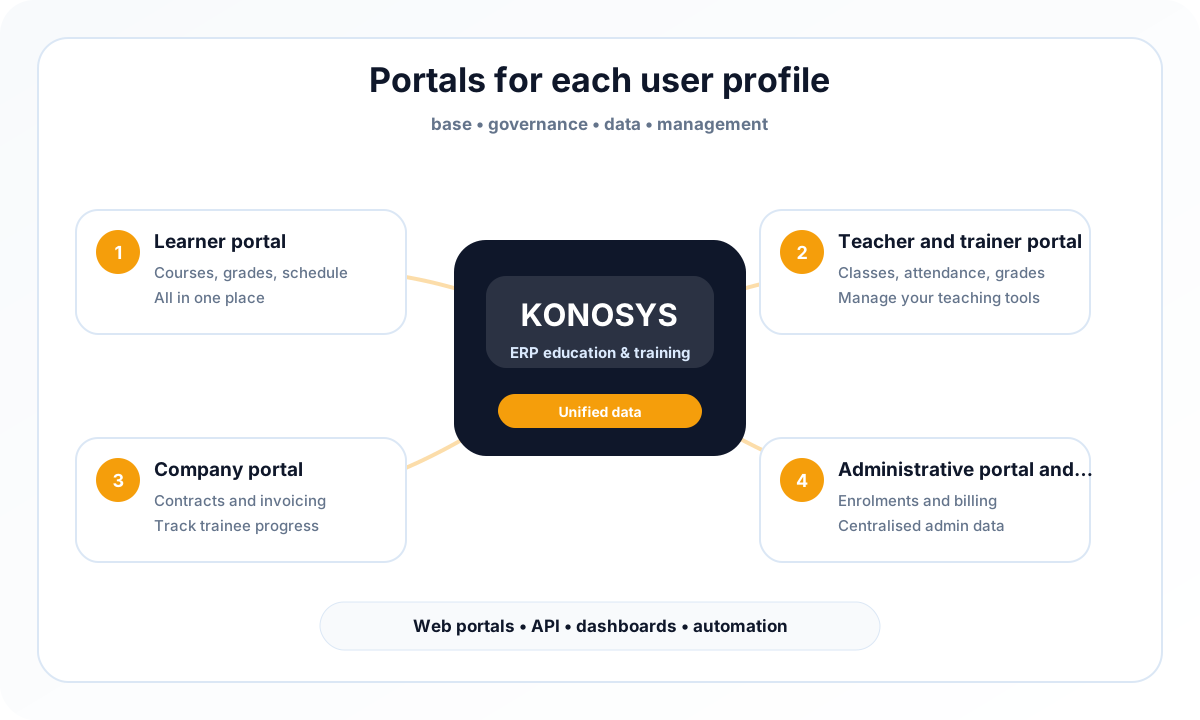
Konosys provides access to useful information from portals adapted to administrators, learners, teachers, businesses and partners.
Konosys portals bring together information useful to each profile in a personalized interface: news, planning, notes, documents, absences, invoices, requests, application files or educational activities.
From the Konosys presentation examples, we find a common logic: each user accesses their dashboard, consults their data, carries out their procedures and follows the progress of their actions without systematically requesting the administration.
This autonomy reduces manual exchanges, improves the quality of the information collected and makes the portal more useful for natural referencing around the searches “student portal”, “teacher portal”, “candidate portal” and “ERP training”.

The student finds his timetable, his results, his supporting documents, his invoices and his requests from the same space.

The trainer views his groups, his sessions, his documents, his training and can access input or monitoring actions.

Specific access can link the attendance sheet, virtual class, meeting documents and educational information.

The candidate follows their files, completes a new application and views the progress of their registration.

The forms guide the entry, collect the necessary documents and directly feed the file into Konosys.
Each portal only exposes the information, documents, actions and workflows useful to the connected profile.
Operational content to identify priority uses, compare deployment options, prepare integrations and organize a useful demonstration with your teams.
Access your courses, learning resources, assessments and track your progress throughout your learning journey.
Manage training sessions, share learning materials, assess learners and monitor their skills development.
Track employee training, access key performance indicators and collaborate efficiently with your training provider.
Manage administrative operations, oversee institutional activities and gain a comprehensive view to support decision-making.
Establishments that want to reduce manual exchanges and give more autonomy to their users.
Konosys draws on historical expertise in education, professional training, large networks and public digital transformation projects.
Schedule a demoKonosys is designed as a management base: it organizes data, processes, portals and connectors around the same business logic dedicated to education and training.
The platform covers the daily needs of administrative, educational, financial, HR and technical teams, while giving management reporting and arbitration capacity.
This positioning makes it possible to reduce application dispersion, make processes more understandable and gradually install training data governance.
Describe your organisation, your volumes, your existing tools and the modules that interest you.