Methodologies for framing, deployment and change management
Find content designed to help management, IT departments and training managers to frame, compare and deploy an education ERP platform.
An agile RAD method to secure module-by-module integration.
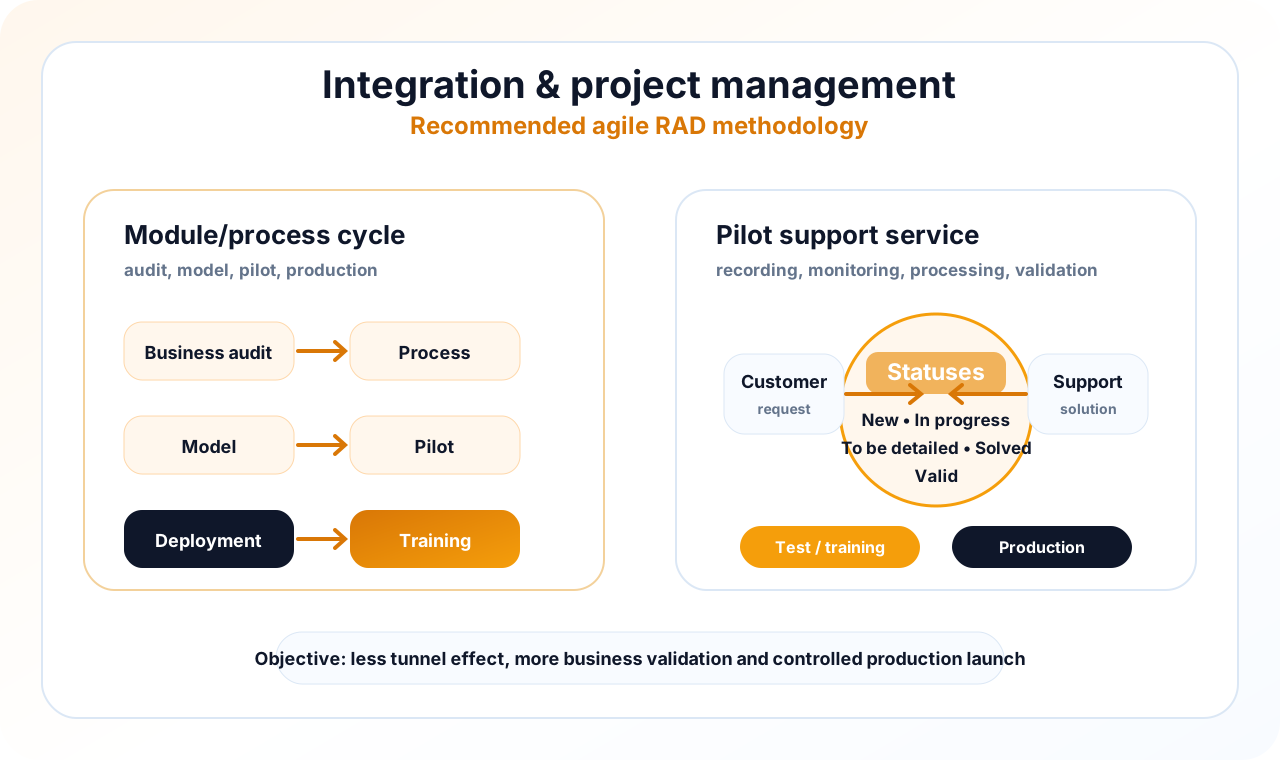
For a Konosys project, we favor an iterative approach: each module or process is framed with business users, modeled, presented, corrected, piloted then deployed. This logic limits the tunnel effect and allows teams to gradually validate screens, rules, data and decision circuits.
The method applies both to a complete ERP start-up and to the gradual activation of modules: admissions, planning, pedagogy, finance, portals, payroll, connectors or reporting. The objective is to transform the business need into a usable, documented and adopted process.
For each module or process
- Audit based on interviews with business users.
- Drafting of expected processes and management rules.
- Creation of a functional model.
- Presentation of the model to business users.
- Validation of the model.
- Training of administrator users.
- Modification of the model according to feedback.
- Pilot proposal on a controlled scope.
- Driver validation by administrator users.
- Modification of the driver and final arbitrations.
- Recovery of useful histories.
- Writing manuals and training materials.
- Deployment and production.
- Training of reference users.
A structured support cycle with Pilote by E-Charlemagne.
After production, the support must remain readable for the teams: recording of the bug or request, support, processing, solution, progress monitoring and validation of the status. This organisation makes it possible to distinguish anomalies, functional requests, usage questions and maintenance actions.
Support can involve telephone, screen sharing, IP voice and email depending on the context. Requests are processed with status logic in order to maintain a clear vision: new, in progress, to be detailed, resolved or validated.
- New
- In progress
- To be detailed
- Resolved
- Valid
A methodology proven in very different contexts.
The Konosys project approach adapts to various organisations: administrations, universities, business schools, engineering schools, professional training organisations, training centers, corporate universities and companies.
This diversity requires a structured method: listening to business users, formalizing processes, validating models, organising pilots and supporting production with readable support.
The examples below illustrate environments where the challenges of data, portals, reporting, planning, finance or training are not identical, but require the same level of project rigor.
What this methodology brings
A concrete project framework to frame, validate, deploy and support users without losing control of the scope.
Audit
User interviews make it possible to identify irritants, priorities, management rules and IS dependencies.
Framing
The processes are formalized before configuration to avoid ambiguities and secure arbitrations.
Data migration
Useful histories are retrieved according to actual continuity, reporting and compliance needs.
Training and change management
Administrators and reference users are trained to facilitate adoption and key users.
A project to work with your teams
Decision-makers, project teams, administrators and business managers in the reflection or deployment phase.
- Identify the processes to prioritize and the modules to activate.
- Map data, portals, roles and authorizations.
- Prepare useful connectors with your IS, your LMS and your financial tools.
- Build a progressive and measurable deployment trajectory.
Published by E-Charlemagne
Konosys draws on historical expertise in education, professional training, large networks and public digital transformation projects.
Schedule a demoContent to prepare a structured decision
Before launching a Konosys project, management must often compare several scenarios: isolated software, business ERP, extension of an LMS, specific development or modular platform.
These resources are used to clarify issues, identify risks, prepare scoping workshops and align business, IS, finance and general management teams.
They are designed to transform a digitalisation intention into a manageable project, with priorities, indicators and a realistic deployment trajectory.
Evaluate Konosys for your specific needs.
Describe your organisation, your volumes, your existing tools and the modules that interest you.